One workspace where a container’s whole journey lives on one screen, for the teams who chase it all day.
TMS platform for a logistics company
The project
A single platform for a container’s whole journey
An internal transport management system for a freight forwarding team that moves containers by sea. Four roles touch every shipment (sales, operations, and the head of the company) and each keeps their part in a different tool. The goal: one platform where every role sees the same shipment, but starts from its own day.

The problem
Five tools, one shipment
A single container passes through spreadsheets, email threads, carrier portals, a CRM and a folder of PDFs. The same client and booking get typed in again at every step, ETAs go stale between updates, and nobody sees at a glance which deal is stuck. When I worked in logistics, there was no one place to see my tasks and how each deal was moving.

TMS
status · documents · invoices · tasks
- 68%
of freight teams juggle 5+ tools a day
Deep Current, 2026 (opens in a new tab) - 70%+
of forwarders lose a quarter of the day to manual work
Ontegos Cloud, 2025 (opens in a new tab) - 37%
of companies can’t track cargo in transit
Tive, 2025 (opens in a new tab)
The research
The work before the screens
Before drawing anything I mapped who touches a shipment and what each of them needs to get done in a day. I compared four tools teams already use (CargoWise, SAP TM, Magaya and Bitrix24) and read their user reviews on G2. The pattern: every feature exists, but the tools are slow to learn, overloaded, and the same for every role. That gave the design three rules.
Who’s here: Sales manager
Type once, use everywhere
The sales manager creates the shipment: client, route, ports, line, vessel and containers. Clients are picked from the existing list instead of being typed again, and every field entered here flows into documents and invoices later. New shipments land in the list with a Booking status, so operations can filter for what is new today.
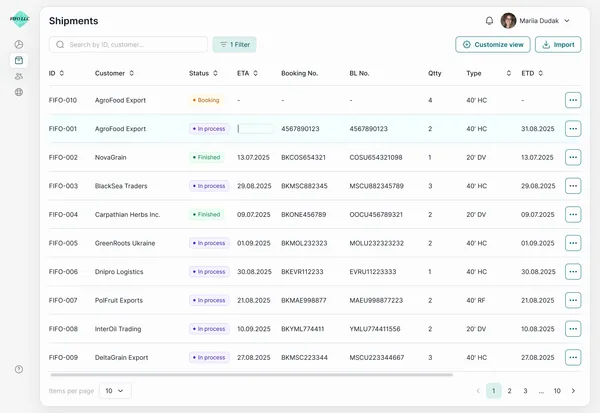
Client picked from the list — no retyping
Status filter: what’s new today
Client picked from the list — no retyping
Status filter: what’s new today
Who’s here: Sales → Operations
A notification, not a chat
The riskiest moment in a shipment is when sales passes it to operations. In most teams it happens in a message that gets buried. Here, creating the shipment notifies operations, and the notification opens it directly, with client, route and documents already filled in.
Opens the shipment, not a chat thread
- Sales managerCreates the shipment
- TMSNotifies operations
- Operations managerOpens it, already filled in
Opens the shipment, not a chat thread
Who’s here: Operations manager
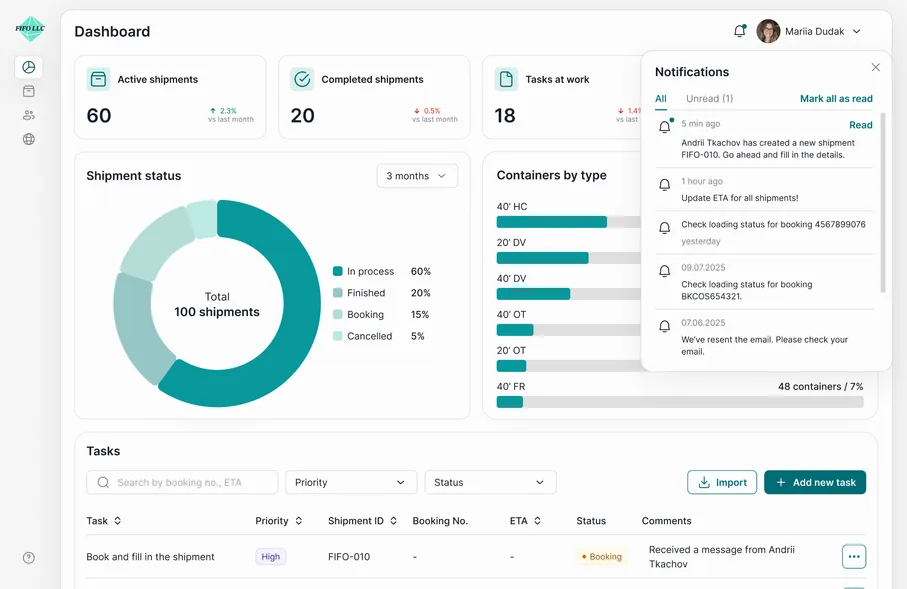
Tasks first, charts later
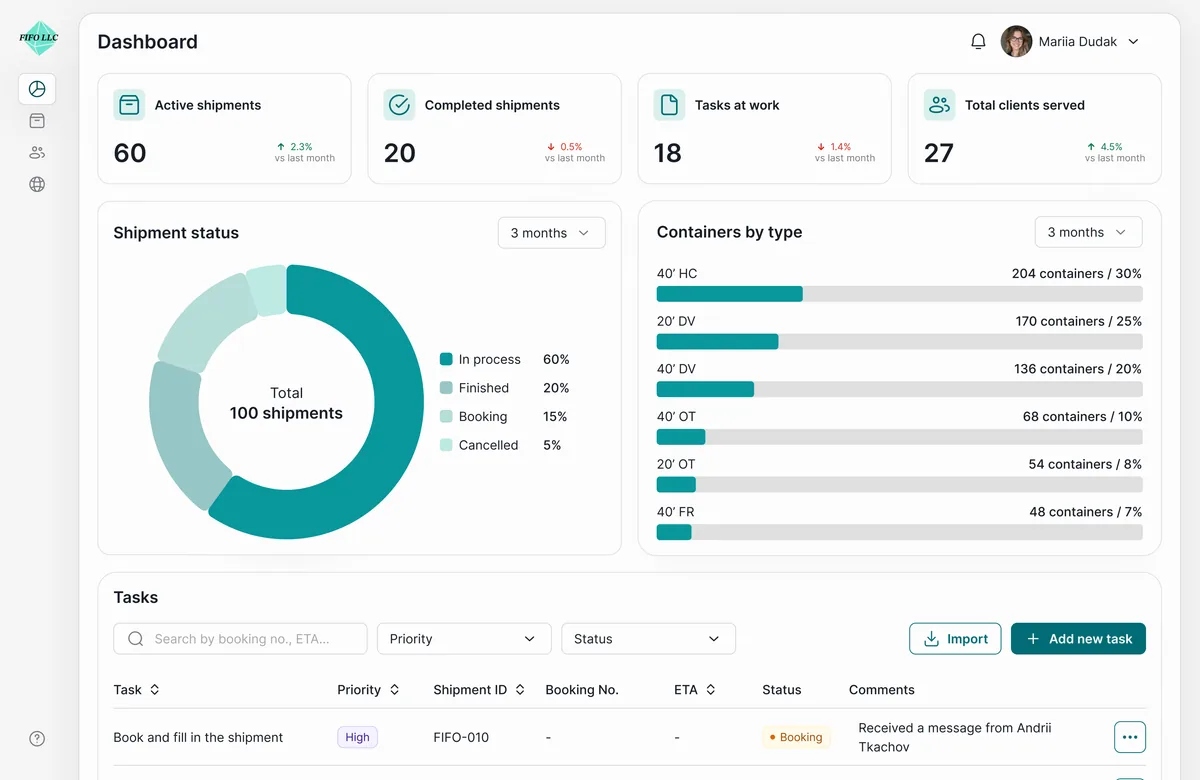
Once the container is on its way, the operations manager’s job is to keep it moving. The dashboard leads with four counters and a task list sorted by priority (Book and fill in the shipment, Update ETA, Check BL) each linked to its shipment. On the phone, the same tasks and statuses fit into one scroll.
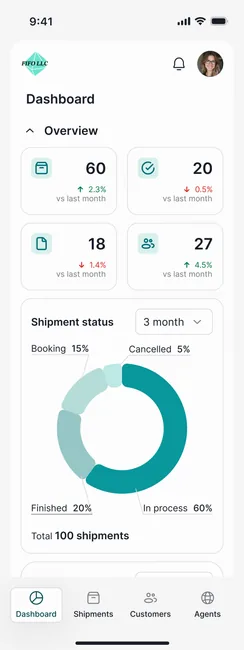
Tasks sorted by priority, each opens its shipment
Tasks sorted by priority
Each task opens its shipment
Who’s here: Operations manager
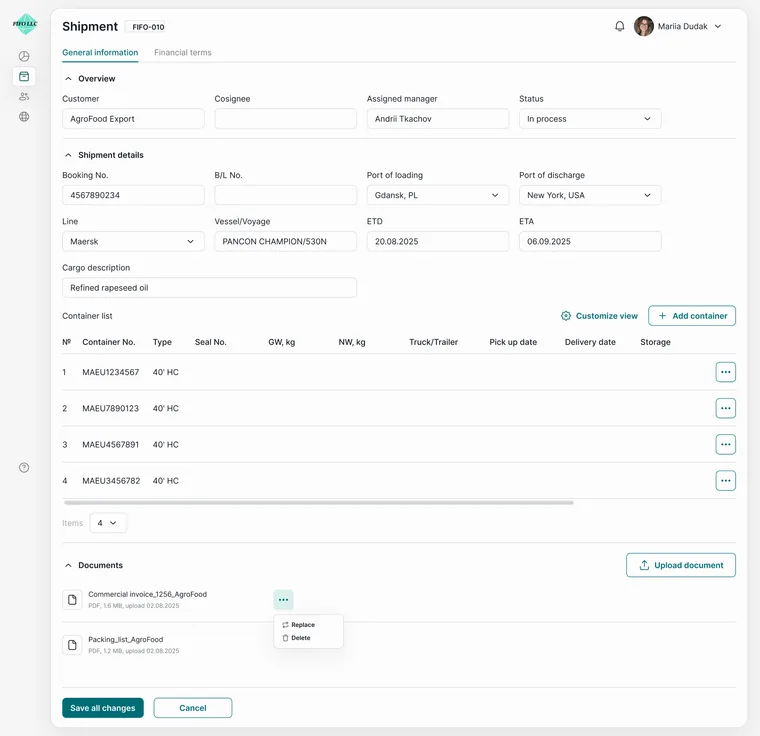
One shipment, one page
Documents, expenses and invoices used to live in separate files. Here they are tabs on the shipment’s own page: the header stays fixed while the content changes underneath. An invoice for the client is built from the shipment data in a couple of clicks, then saved or exported - nothing is typed twice.
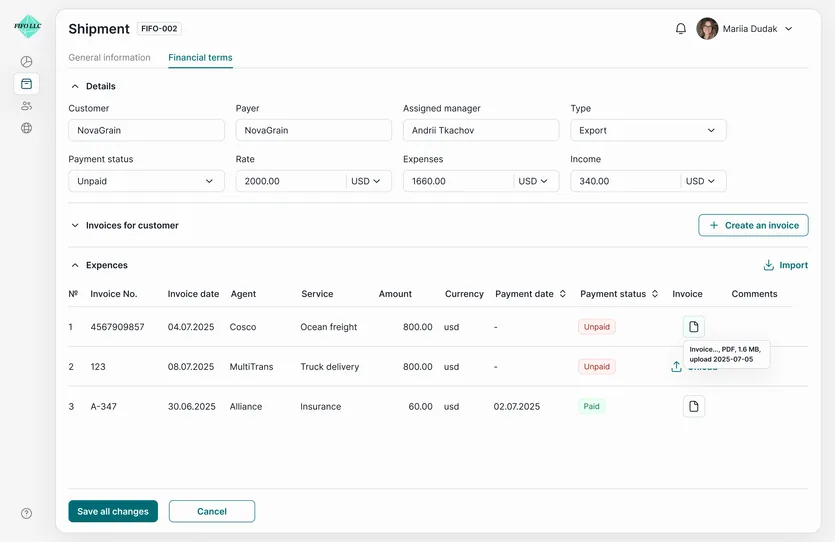
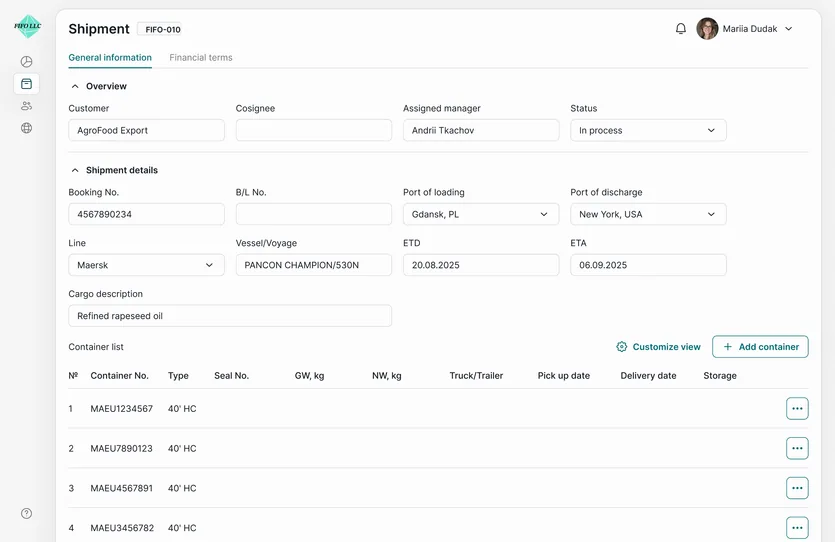
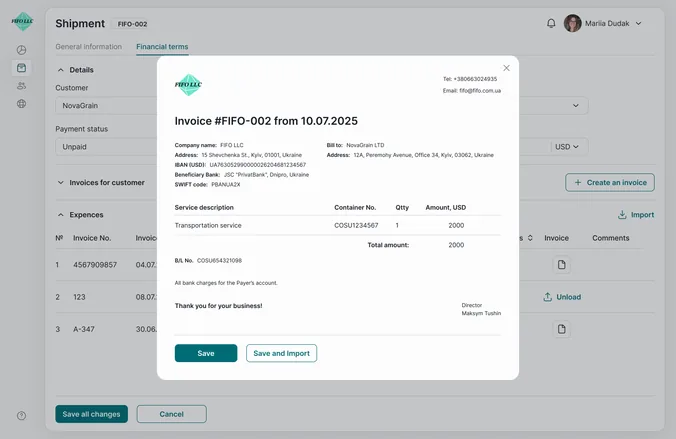
Header stays put, tabs change below it
Invoice built from shipment data
Header stays put, tabs change below it
Invoice built from shipment data
Who’s here: Head of company
Same data, read differently
The head of the company doesn’t wait for a report from the team. The shipments operations work with every day feed the dashboard charts (status split and container types) with a period switch from one month to a year. Nobody compiles anything by hand.
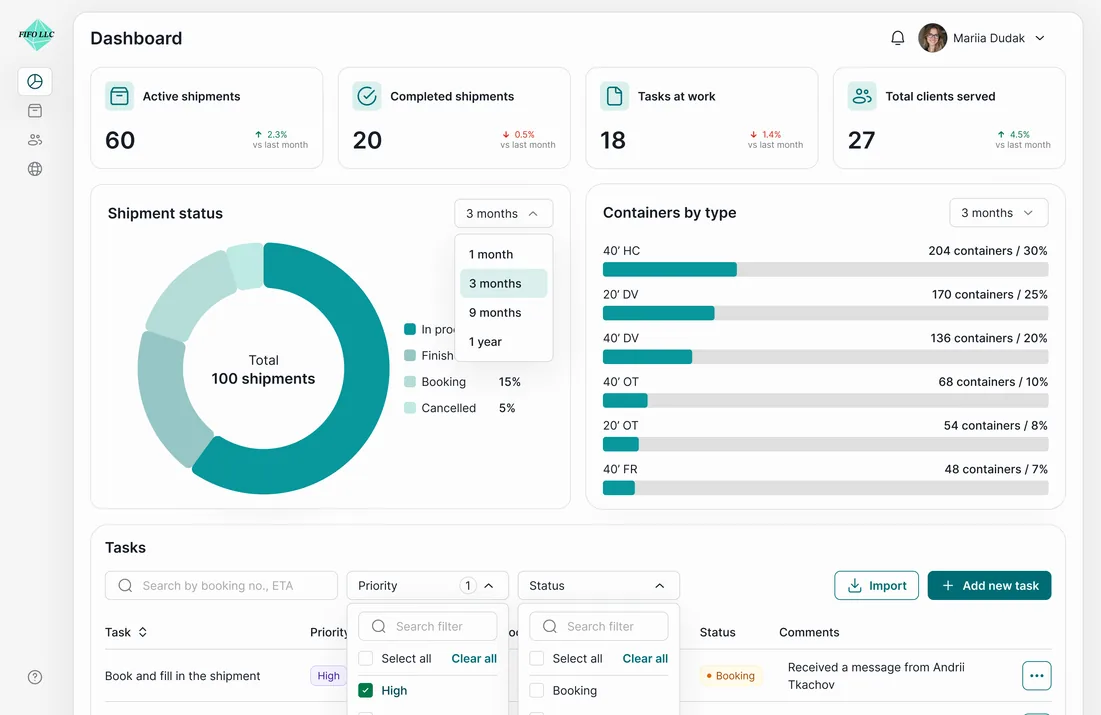
One click from 1 month to 1 year
One click from 1 month to 1 year
Empty lists, no results, small screens...
No dead ends
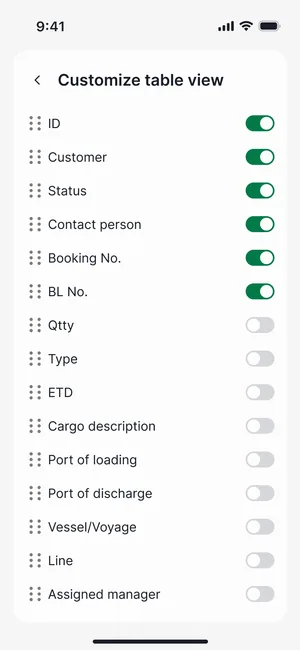
A tool people use all day is judged by its edge cases. An empty list explains what will appear there and who creates it. A search with no results offers to clear the filters in one click instead of a dead end. On the phone, managers choose which columns they need, so a wide table still fits a narrow screen.
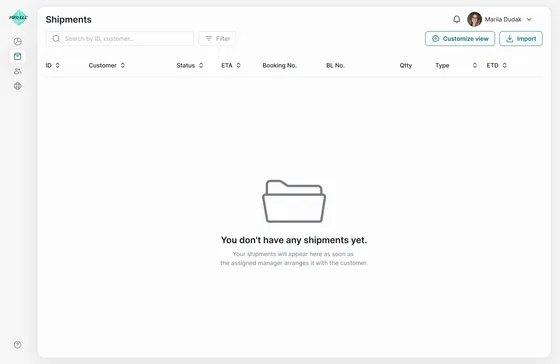
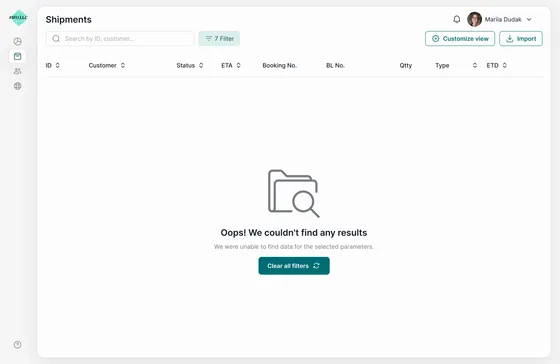
Every empty state says what to do next
Every empty state says what to do next
The result
A single workspace where a container’s status, documents and invoices stop living in five places, and each role starts from its own day. This is a self-initiated concept, not a shipped product, so there are no usage numbers. What I would measure first: how long it takes to create a shipment and hand it to operations, compared with today’s spreadsheets and email.